
| « Transformers Motorola MOTOROKR E6 | Ubuntu 7.04 Feisty on ASUS A6J Laptop » |

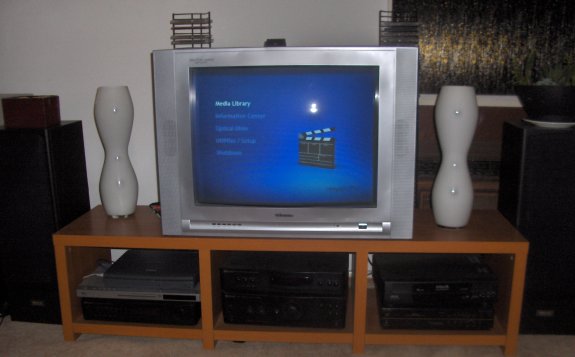
This Toshiba Satellite Pro 4270 originally belonged to my Aunt but the LCD screen died and she ended up getting another new laptop. So this was how I ended up with a headless laptop and decided to install MythTV (without TV tuner features) as a media center box that can play DVDs, VCDs and movies off my file server.
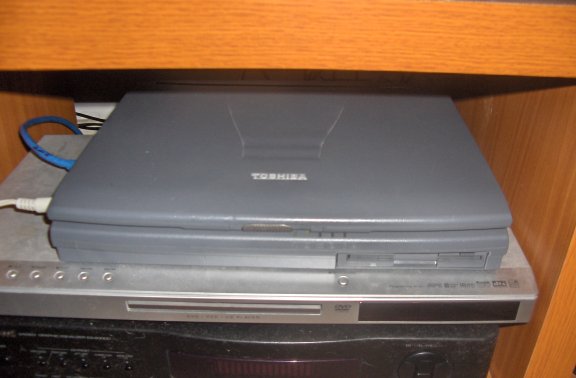
Hardware Specifications
- Celeron 500Mhz
- 192 MB SDRam 100mhz
- S3 Savage AGP 2 Video card - Video RAM 8 MB
Supported Display Graphics: VGA (640x480), XGA (1024x768), SVGA (800x600)
- 10 Gig IDE Hard Drive
- DVD Rom
- Floppy Drive
- TV Out - NTSC, PAL
Output of lspci
00:00.0 Host bridge: Intel Corporation 440BX/ZX/DX - 82443BX/ZX/DX Host bridge (rev 03)

00:01.0 PCI bridge: Intel Corporation 440BX/ZX/DX - 82443BX/ZX/DX AGP bridge (rev 03)

00:05.0 Bridge: Intel Corporation 82371AB/EB/MB PIIX4 ISA (rev 02)

00:05.1 IDE interface: Intel Corporation 82371AB/EB/MB PIIX4 IDE (rev 01)

00:05.2 USB Controller: Intel Corporation 82371AB/EB/MB PIIX4 USB (rev 01)

00:05.3 Bridge: Intel Corporation 82371AB/EB/MB PIIX4 ACPI (rev 03)

00:07.0 Communication controller: Agere Systems 56k WinModem (rev 01)

00:09.0 IRDA controller: Toshiba America Info Systems FIR Port Type-DO

00:0b.0 CardBus bridge: Toshiba America Info Systems ToPIC100 PCI to Cardbus Bridge with ZV Support (rev 20)

00:0b.1 CardBus bridge: Toshiba America Info Systems ToPIC100 PCI to Cardbus Bridge with ZV Support (rev 20)

00:0c.0 Multimedia audio controller: Yamaha Corporation YMF-744B [DS-1S Audio Controller] (rev 02)

01:00.0 VGA compatible controller: S3 Inc. 86C270-294 Savage/IX-MV (rev 11)

02:00.0 Ethernet controller: Xircom Cardbus Ethernet 10/100 (rev 03)
Ubuntu Linux Installation
Ubuntu Feisty 7.04 installed fine although not through the graphical installer of the live CD which needed at least 256mb of ram. Default packages also work great except one minor gripe with the ACPI power settings causing the Toshie not to power off on shutdown. However, this was easily fixed by installing the toshset package.
Setting up TV output
To enable TV Out connection simply add the following to /etc/X11/xorg.conf
Section "Device"

        Identifier      "S3 Inc. 86C270-294 Savage/IX-MV TV"

        Driver          "savage"

        Option          "TvOn"

        Option          "PAL"

EndSection
The video output can be toggled with the s3switch package which allows the switching of display with the s3switch command as follows
:~# s3switch tv
MythTV setup
The following packages and their dependent packages are required,
- mythtv
- mythtv-backend
- mythtv-backend-master
- mythtv-common
- mythtv-database
- mythtv-frontend
- ubuntu-mythtv-frontend - allows the mythtv front end to start up automatically on boot.
- mythvideo - for playing videos
- mythgame - for playing games with emulators like zsnes
- mythmusic - for playing music
- mythdvd - for playing dvds and vcds
- mythbrowser - for Web browsing
- mplayer - best ever media player on Linux
- w32codecs - for additional video codecs
all packages are available from standard Ubuntu repositories except w32codecs which I think you can get from medibuntu.
Customization of the MythTV menu can be done by editing the XML files in /usr/share/mythtv which was really useful for me since I did not have a TV Tuner and was not interested in any of the TV configuration and channel menus.
Another issue I had was mythdvd’s built-in DVD player which did not work very well at all, fortunately it was easy to setup mplayer for playing DVDs through the configuration menus.
There also does not seem to be a way of accessing network directories (samba and nfs shares) directly from mythtv so I had mount them on the system through fstab. Also take note that you have to refresh the movies library though the Media settings configuration page in order to see changes.
Last complaint is that zsnes on mythgame cant be configured through the mythtv front end. I had to install and configure zsnes on another box then copy the “.zsnes” folder from my home folder on that box over to /home/mythtv on the myth box.



Brinley Ang is a software engineer, sysadmin, coder, geek boy, jedi knight fragger, caffine addict, deaf meloncholic and rockstar wannabe. Listens to the sex pistols and a wide assortment of heavy metal.


